Censor PNG Images for Free
Maya Chen — Tech Writer & Privacy Advocate Part of: Blur Photo Complete Guide: Methods, Tools & Best Practices (2026)Read the complete guide →
How to Censor PNG Images Online (Free & Fast)
You just downloaded 50 PNG graphics for a client presentation and realized three contain sensitive data that must be censored before sharing. Need to censor PNG files quickly online? Manually opening each file in Photoshop, drawing mask layers, and exporting takes 3 minutes per image — that's 150 minutes of tedious work. Miss one face or license plate, and you've exposed private information that violates GDPR or client confidentiality agreements.
The manual censoring workflow forces you through 4 repetitive steps: import the PNG, create a layer mask with transparency preserved, apply the blur effect or pixelated overlay, then export while maintaining the alpha channel. Desktop tools like GIMP and Canva offer blur effects and redaction features, but they require precise manual selection of each region you want to censor. Batch-processing transparent background PNGs becomes even harder when you need consistent censored image quality across dozens of files with varying opacity levels and vector graphics.
A faster method exists. Automated tools now detect sensitive regions in PNG files and apply mosaic effects or black bar overlays in 30 seconds with just 3 clicks — no layer masks, no manual selection, and transparent backgrounds stay intact.
Common Approaches to Censor PNG
You need to censor sensitive content in an image—faces, text, license plates, or NSFW elements. The challenge: most censoring methods destroy the transparent background of PNG files, forcing you to rebuild the alpha channel from scratch. Below are four proven methods that preserve transparency while applying effective censorship.
Method 1: Download Pre-Made Censor PNG Overlays
Freepik, Flaticon, and Pngimg host thousands of royalty free censor PNG graphics with transparent backgrounds. These clipart-style overlays work perfectly when you need a quick visual indicator—black bars, pixelated effect boxes, or mosaic effect squares—without editing the original image.
Search "censored transparent" or "censor icon" on Freepik or Pixabay. Download a PNG with an alpha channel (check the preview for checkerboard transparency). Open your base image in Photoshop or GIMP. Drag the censor PNG onto your canvas as a new layer. Position it over the sensitive area—scale and rotate using the transform tool until it covers what you need hidden. Export as PNG to preserve both the overlay and the transparent background beneath it.
Limitation: Pre-made graphics look generic. A black bar with "CENSORED" text works for memes but fails professional redaction standards. Stock images also carry Creative Commons licenses—verify attribution requirements before commercial use.
Method 2: Create Custom Blur Effect Overlays in GIMP
GIMP (free, open-source) lets you build custom censored image overlays with precise opacity control. This method works when you need a soft blur effect that hints at context without revealing details—ideal for privacy protection in screenshots or graphic design mockups.
Open GIMP and create a new image with transparent background (File → New → Advanced Options → Fill with: Transparency). Use the rectangle select tool to mark the area you want to blur. Fill it with 50% gray (Edit → Fill with FG Color). Apply Filters → Blur → Pixelize—set pixel size to 15-20 for heavy censorship or 8-10 for subtle redaction. Adjust layer opacity to 80-90% so the blur blends naturally. Export as PNG (File → Export As → select PNG). Now you have a reusable blur effect overlay with transparency intact.
Drag this censored PNG onto any photo in GIMP or Canva. Position it over faces, text, or sensitive data. The transparent edges blend seamlessly—no hard borders. Export the final composite as PNG to maintain the alpha channel.
Limitation: Manual positioning takes time. If you're censoring 50 photos from an event, you'll spend 2-3 minutes per image aligning the overlay. Batch processing requires scripting knowledge.
Method 3: Use Canva's Built-In Censor Elements
Canva offers drag-and-drop censor graphics in its Elements library—black bars, pixelated squares, and emoji-style icons. This method works for social media posts, Instagram stories, or quick image editing when you don't need pixel-perfect precision.
Open Canva and upload your PNG (Design → Upload → select file). Search "censor" in the Elements panel. Drag a black bar or pixelated effect box onto your canvas. Resize it to cover the sensitive area—Canva preserves transparency automatically if your original PNG had an alpha channel. Click the element and adjust opacity (20-100%) for partial censorship. Download as PNG with transparent background enabled (Share → Download → File type: PNG → check "Transparent background").
Canva works on mobile devices too. Open the app, tap Elements, search "censored," and apply overlays directly from your smartphone. Export as PNG—the transparent background transfers to your camera roll.
Limitation: Free Canva accounts limit downloads to 10 transparent PNGs per month. The watermark appears on premium elements unless you upgrade. Pre-made censor graphics look identical across millions of users—your censored image won't stand out.
Method 4: Build Vector Graphics Censor Shapes in Adobe Illustrator
Adobe Illustrator creates scalable vector graphics that export as high-quality PNG with transparency. This method suits professional graphic design workflows—logos, product mockups, or print materials where pixelation ruins the aesthetic.
Open Illustrator and create a new document (File → New → set artboard to your image dimensions). Draw a rectangle using the shape tool (M key). Fill it with black or apply a gradient. Apply Effect → Pixelate → Mosaic Effect for a blocky censor look—set tile size to 10-15 pixels. Alternatively, apply Effect → Blur → Gaussian Blur for a soft redaction. Select the shape and adjust opacity in the Transparency panel (Window → Transparency → set to 70-90%).
Export as PNG (File → Export → Export As → PNG → check "Use Artboards" and "Transparent Background"). Place this censored PNG over your base image in Photoshop, GIMP, or any layer-based editor. The vector source means you can scale it 10x without quality loss—perfect for print materials or high-resolution web graphics.
Limitation: Adobe Illustrator costs $22.99/month. The learning curve intimidates beginners—expect 30-60 minutes of tutorials before you can build custom shapes efficiently. Free alternatives like Inkscape exist but lack Illustrator's pixelate and blur effects.
Comparison: Pixel Blur vs Mosaic vs Censor Bar
Censorship TypeBest ForTransparencyStylePixel Blur PNGFaces, NSFW objects✅Blocky, retroMosaic CensorshipLogos, ID cards, documents✅Smooth pixel blocksCensor Blur EffectBackgrounds, subtle edits✅Soft focusCensor Bar (Bow)Text, eyes, humorous use✅Bold, classic, visible
Different styles serve different use cases. For full facial anonymity, try face blur. For background privacy, see blur PNG.
When Should You Censor an Image?
Here are the most common reasons users search for censorship tools:Social Media: Blur usernames, faces, or NSFW parts before posting.Streaming & YouTube: Hide private data in overlays, game screens, or thumbnails.Education & Healthcare: Protect identities in case studies or reports.No matter the reason, BlurMe’s image censorer lets you choose exactly how much and how little you want to hide.Need to downsize after editing? Use our guide to resize images to 20KB without losing quality.
Faces or plates to hide in your photo?
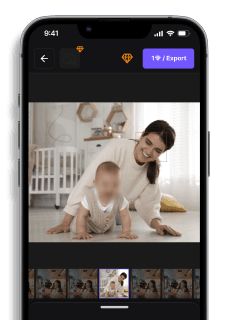
Upload and the AI blurs them automatically in seconds.
Best Practices for Creating Censored Images
To get the best result when censoring PNGs:Keep what matters: Blur or block only the areas that need redaction.Preserve the context: Too much blur removes meaning; use mosaic or pixelation to hint without exposing.Export as PNG: It retains transparency, quality, and keeps your edits clean.
Frequently Asked Questions (FAQs)
How can I censor a PNG image for free?Use the BlurMe Image Blur Tool. Upload your image, apply the desired blur or censor bar, and download your censored PNG instantly.### What’s the difference between pixel blur and mosaic censor?Pixel blur PNG uses enlarged square pixels to obscure content, while mosaic censorship uses smoother tiled blocks for a cleaner look. Check out How to Pixelate an Image Online for more precise methods.### Can I keep transparency in the censored image?Yes, BlurMe exports transparent PNGs so you can use the image as an overlay or in layered designs.### What is a censor bow?A censor bow usually refers to the black bar placed over eyes, text, or NSFW areas for comedic or privacy purposes.
Final Thoughts
Whether you’re blurring private data, pixelating faces, or adding a censor bar for laughs, BlurMe makes it simple to censor PNG images online with zero downloads, zero cost, and zero stress.Ready to censor your PNG in seconds?Use BlurMe’s free online tool to blur, pixelate, or hide anything👉 Censor your PNG now with BlurMeFree to start### Faces or plates to hide in your photo?Drop a photo or video in your browser and the AI auto-blurs faces, license plates, and personal info in seconds.Upload free
Faces or plates to hide in your photo?
Drop a photo or video in your browser and the AI auto-blurs faces, license plates, and personal info in seconds.
Upload free