Mosaic Censorship: How to Censor Images & Videos with Pixel Blur
Maya Chen — Tech Writer & Privacy Advocate Part of: Blur Photo Complete Guide: Methods, Tools & Best Practices (2026)Read the complete guide →
You’ve probably seen it everywhere; pixelated faces on crime shows, blurred license plates on YouTube, or a black bar over someone’s eyes in memes. That’s mosaic censorship, and it’s more than just a stylistic choice. It's a crucial technique used in media, journalism, law enforcement, and social content creation to protect privacy and obscure sensitive information.Whether you're editing a YouTube video, redacting CCTV footage, or trying to create a censorship drawing for artistic effect, the mosaic censoring technique is one of the fastest and most effective tools available.Let’s break down what mosaic censorship means, how to use it, and why it’s still the most effective method for image and video redaction today.
Mosaic Censorship Meaning: What Does It Actually Do?
The term mosaic censorship refers to the technique of obscuring parts of an image or video by replacing them with large square blocks — known as pixels — to make the censored area unrecognizable. This is often referred to as:Pixelation or pixelization (used interchangeably)Censor blur or mosaic blurThe mosaic filter (especially in editing apps)A censor bar or black bar over eyes (a variation)Image censoring or photo anonymization### Common Uses for the Mosaic Censorship EffectCensoring faces or license plates in videosProtecting personal data in screenshotsHiding sensitive parts of an imageArtistic or humorous effects in memesRedacting video footage for legal or journalistic reasons
Faces or plates to hide in your photo?
Upload and the AI blurs them automatically in seconds.
How to Apply Mosaic Censorship with BlurMe (Tutorial)
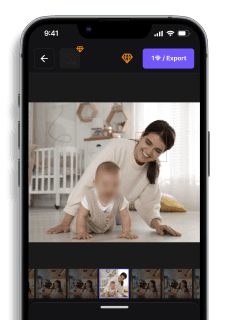
Want to censor a picture or pixelate a video? BlurMe makes it effortless — no need for Photoshop or video editing software.### How to Censor an Image Online with BlurMeGo to BlurMe’s Online Censor ToolVisit BlurMe Studio to start the image censor.Upload Your ImageUpload your photo in JPG, PNG, or WebP format.Choose a Censorship MethodFull Screen Blur: Apply blur to the entire image.AI Blur: Automatically detect and blur faces, bodies, license plates, or objects.Custom Blur: Manually paint over the areas you want to censor using the brush tool.Adjust Blur SettingsUse the intensity slider for pixel size control to increase or decrease the censorship effect.Preview and RefineToggle blurred areas on/off, erase parts you don’t want blurred, convert image as needed.Download Your Censored ImageOnce satisfied, click Download to save your edited image in high quality.Want to protect faces instantly? Try BlurMe’s Face Pixelizer — our AI detects and pixelates multiple faces in one click.### How to Apply Mosaic Censorship to VideoUpload your video to BlurMe’s video editorChoose Pixelate EffectSelect Face Detection (automatic) or manually apply Mosaic BlurFine-tune the pixelation or apply a censor bar over eyesExport your censored video — watermark-free with BlurMe ProPro Tip: BlurMe also supports Live Video Anonymization and CCTV Redaction for law enforcement and surveillance content.
Types of Censorship Effects You Can Apply
EffectDescriptionBlurMe FeatureMosaic BlurPixelized squares that obscure the content✅ AvailableEye Censor BarBlack bar over the eyes, classic meme-style censoring✅ AvailableCensor Blur (Gaussian)A soft blur instead of pixelation✅ AvailableText CensoringOverlay black blocks or blur sensitive information✅ Available
If you’re looking for something more than a blur — like completely erasing faces or blurring license plates — check out our advanced Censor Image Online tutorial.
Benefits of Using the Mosaic Filter for Censorship
Easy to recognize: Viewers know instantly that content is censoredUnrecoverable: Proper pixelation cannot be reversedStylized effect: Used in editorial and creative workWidely supported: Works across all platforms and browsersBlurMe’s online editor simplifies the photoshop mosaic effect — no installation or editing expertise required.
Censorship Drawing & Artistic Pixelization
Mosaic censorship isn’t just for hiding things — it's also a growing artistic trend. Designers and illustrators use pixelization to evoke nostalgia, glitch aesthetics, or surrealism.You can create an entire censorship drawing by strategically applying the mosaic blur to faces, bodies, or objects, transforming your image into something abstract or symbolic.For artists and creators, BlurMe offers full control over how and where you apply the effect — whether it’s just a censor bar over eyes or a full-face pixelization.
FAQ: Everything You Need to Know About Mosaic Censoring
What is mosaic censorship?Mosaic censorship is the use of pixelated blocks to obscure parts of a photo or video, usually to protect identities or hide sensitive content.### What's the difference between pixelation and blur?Pixelation (mosaic filter) breaks the image into visible squaresBlur (Gaussian or motion) softens the image without distinct blocksBlurMe lets you choose either based on your desired effect.### Is pixelation the same as censorship?Pixelation is a form of censorship, but not the only one. Others include black bars, object removal, or full redaction. Learn more in our Redaction Software for Law Enforcement guide.### Can I censor just one part of a photo?Absolutely. BlurMe’s Custom Blur tool lets you select and pixelate just one portion of an image — like a person’s face, a phone screen, or a logo. Try our Censor PNG tool to test it instantly.
When to Use Mosaic Censoring (And When Not To)
Use Mosaic Censorship When...Consider Alternatives When...You need to quickly obscure a faceYou want to remove the object entirelyYou want an intentional censorship lookYou need clean image restorationIt's a video that needs privacy maskingThe subject must remain editable later
Need help deciding? Our blog post on Redaction Meaning explains the difference between blur, censor, and full redaction.
FAQ
How do you add mosaic blur to a photo in Photoshop?
Open your photo in Photoshop, then use the Lasso Tool or Rectangular Marquee Tool to select the object you want to censor. Go to Filter → Pixelate → Mosaic and adjust the Cell Size slider (typically 8-15 pixels for most objects). Click OK to apply the effect — the entire process takes about 30 seconds per object. For batch processing multiple photos, record these steps as an Action and apply it to folders containing hundreds of images.
What is the difference between mosaic and pixelation?
Mosaic and pixelation are the same technique — both divide an image into larger square blocks to obscure details. The term "mosaic" comes from Japanese media censorship practices, while "pixelation" is the technical name used in image processing software like Photoshop. Photoshop's Filter → Pixelate → Mosaic creates square blocks ranging from 2-64 pixels in size. Gaussian blur creates a smooth, soft effect instead of blocky squares, making pixelation more suitable for compliance documentation where reversibility concerns exist.
Can you automatically apply mosaic censorship to photos?
Photoshop requires manual selection — you must draw around each object with the Lasso Tool before applying the mosaic filter, which takes 1-2 minutes per photo depending on complexity. For automatic detection and censorship, use AI-powered tools like blur.me that detect objects instantly and apply blur in approximately 3 seconds per photo. Batch-process 100 event photos with automatic detection in about 5 minutes total versus 100-200 minutes of manual Photoshop selection work.
What software is best for mosaic censorship in photos?
Adobe Photoshop ($22.99/month) offers precise manual control with its Mosaic filter and advanced selection tools for professional editing workflows. GIMP provides free pixelation capabilities with similar quality but a steeper learning curve. For automatic object detection and batch processing, blur.me handles hundreds of photos at once with AI-powered selection — no manual drawing required. Choose Photoshop when you need pixel-perfect control over specific regions; choose automated tools when processing large photo batches for privacy compliance.
Is mosaic censorship reversible in Photoshop?
Once you save and close a photo with mosaic censorship applied in Photoshop, the original pixel data is permanently destroyed — the effect is irreversible. However, if you keep the PSD file with layers intact, you can delete the pixelated layer to restore the original. For guaranteed irreversible censorship, flatten all layers (Layer → Flatten Image) and export as JPG before sharing. Academic research shows that mosaic blocks smaller than 8x8 pixels may be partially reversible using AI reconstruction techniques, so use Cell Size 10 or higher for sensitive content.
Final Thoughts: Why Mosaic Censorship Still Matters
In a world of oversharing and deep surveillance, mosaic censorship is one of the simplest but most powerful tools for protecting what matters. It’s universally understood, impossible to ignore, and incredibly easy to apply — especially with tools like BlurMe that make censoring pictures, videos, and faces as fast as uploading a file.If you’re wondering how to censor a picture, pixelate a video, or add that classic eye censor bar, start with BlurMe today.Free to start### Faces or plates to hide in your photo?Drop a photo or video in your browser and the AI auto-blurs faces, license plates, and personal info in seconds.Upload free
Faces or plates to hide in your photo?
Drop a photo or video in your browser and the AI auto-blurs faces, license plates, and personal info in seconds.
Upload free