TikTok watermark remover tools are a lifesaver when you want to reuse your videos across different platforms. TikTok automatically adds its moving logo watermark to every video you download, a small but distracting detail if you’re repurposing content for Instagram Reels, YouTube Shorts, or other social channels.
This guide breaks down the most effective ways to remove or blur the TikTok watermark online, helping you keep your videos clean, professional, and ready for cross-platform sharing without losing quality.
Why Does TikTok Add a Watermark?
TikTok watermarks exist to credit the original creator and discourage unauthorized reposting. However, if you're the content creator and want to reuse your own video without the watermark, or if you're working on edits that require a clean frame, removing it becomes essential.
How to Remove a TikTok Watermark
1. Removing a TikTok Watermark Using BlurMe’s Blur Tools
The easiest way to remove a TikTok watermark online for free is by blurring it with BlurMe, an AI-powered video editor that works directly in your browser. You can blur any area of a video including logos, faces, or the TikTok watermark in just a few clicks.
How to Remove TikTok Watermark with BlurMe
- Upload your TikTok video
Go to BlurMe Studio and upload your video.

- Select the watermark area
Use the Custom Blur tool to highlight the TikTok logo or watermark on the screen.

- Adjust blur strength
Fine-tune the blur’s size and intensity to match your video’s frame and style.

- Preview and export in HD
Review the video, then download your new HD watermark-free version, ready to share on YouTube, Instagram, or anywhere else.
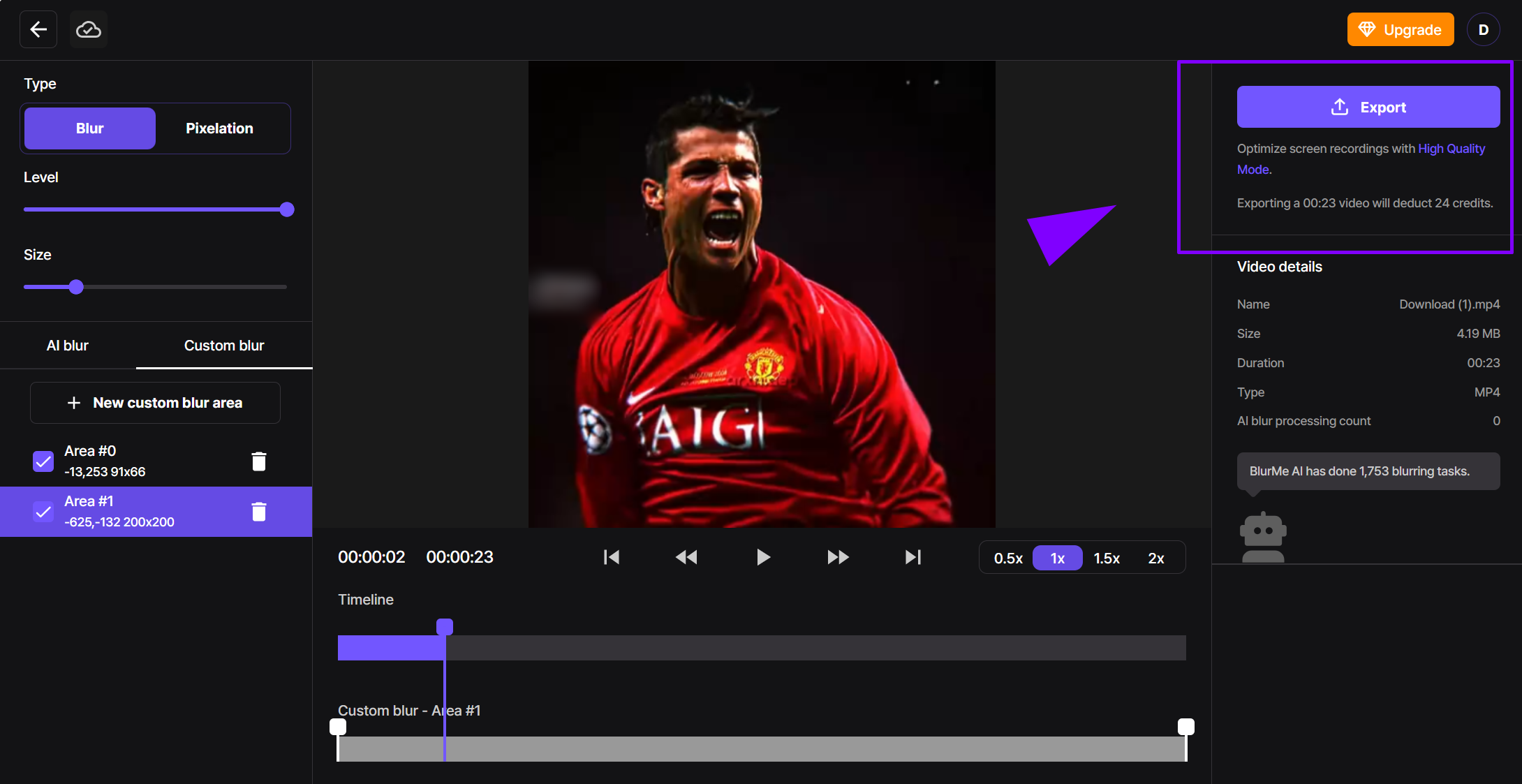
BlurMe’s AI blur tool makes it simple to hide watermarks, faces, or logos automatically.
👉 Try BlurMe free to remove TikTok watermarks and clean up your videos instantly.
BlurMe’s blurring tools are also useful for hiding personal data, and even learning how to blur videos for added privacy.
2. Using Online TikTok Watermark Removers
Several online tools allow you to remove the TikTok logo quickly. These TikTok tools to remove watermarks typically work by analyzing the video and automatically erasing the watermark through AI-based algorithms. However, some may lower video quality, so choose one with high-resolution output.
Best TikTok Watermark Removers
If you're looking for direct TikTok watermark removers, here are some popular websites:
- SnapTik – Allows users to download TikTok videos without watermarks.
- MusicallyDown – A free online tool for saving TikTok videos without the logo.
- SaveTik – Provides HD video downloads while removing watermarks.
- SSSTikTok – A well-known TikTok downloader with watermark-free options.
- TikMate – Works across different devices for removing watermarks.
Each of these tools works differently, but for the highest-quality watermark removal, using BlurMe’s AI face blur tools ensures a clean, polished look while maintaining full video resolution.
3. Cropping the Watermark Out
A simple but effective solution is cropping. Since TikTok places the watermark near the edges, you can use a video editing tool to trim the frame. Keep in mind that cropping too much might affect your video’s composition.
4. Using Blur Tools to Hide the Watermark
Instead of outright removing the watermark, you can blur it to make it less noticeable. Tools like Blur Videos allow you to selectively blur areas of your video, making the watermark fade into the background. This method is particularly useful when removing the watermark manually without sacrificing quality.
If you're dealing with faces or sensitive information, you might also want to learn How to Blur Videos effectively.
What to Know Before Removing The TikTok Watermark
TikTok adds a watermark to every downloaded video for a reason. The watermark helps maintain creator visibility and protects original content from being reposted without credit. However, there are legitimate situations where removing or blurring it is useful, like when you’re editing your own videos for other platforms, creating compilations, or adding custom branding.
Professionals in social media management and content repurposing often use AI watermark removers or blur tools to clean up their footage while preserving quality. The key is to edit responsibly only remove or obscure the watermark when you’re working with videos you own or have permission to reuse. Understanding that distinction not only protects your content legally but also builds long-term credibility as a creator.
Alternative Ways to Download TikTok Videos Without a Watermark
If you want to remove the TikTok logo before it even appears, some third-party tools and browser extensions allow you to download videos directly without watermarks. However, TikTok frequently updates its policies, so always ensure you're following their guidelines.
Repurposing TikTok Videos for Other Platforms
Once you’ve successfully removed the watermark, you can optimize your content for other platforms. Whether you're sharing on YouTube Shorts, Instagram Reels, or Twitter, make sure to format your videos correctly. If you're repurposing TikTok videos for Twitter, using a Twitter to MP4 Converter can be helpful. The same goes for YouTube, where a YouTube to MP4 Converter can ensure high-quality downloads.
Final Thoughts
Removing a TikTok watermark can be useful for personal edits, content repurposing, or maintaining a clean aesthetic in your videos. Whether you choose to crop, blur, or use AI-based removers, make sure to respect copyright rules and always credit original creators when necessary.
If you're looking for more creative editing techniques, you can explore comprehensive editing apps like CapCut or even check out the best sites for free movies, anime movies, and hindi mp4 movies to expand your video access.
By choosing the right TikTok watermark remover, you can maintain high-quality visuals, get rid of watermarks and take your content to the next level. Happy editing!